


How to work with scripted pages
Note: When maintaining a website with scripted pages, you will not be able to create a brand-new page using the old design. Any net-new pages created must be built using the new design templates.
Scripted pages CAN be edited, however, allowing agencies to fix errors or update sections in the scripted page. A scripted page can be edited, updated, saved, published, unpublished and deleted.
Example:
An agency has a scripted section called Divisions, and it has five pages within the Divisions folder. Divisions/page01, Divisions/page02, Divisions/page03, Divisions/page04, Divisions/page05.
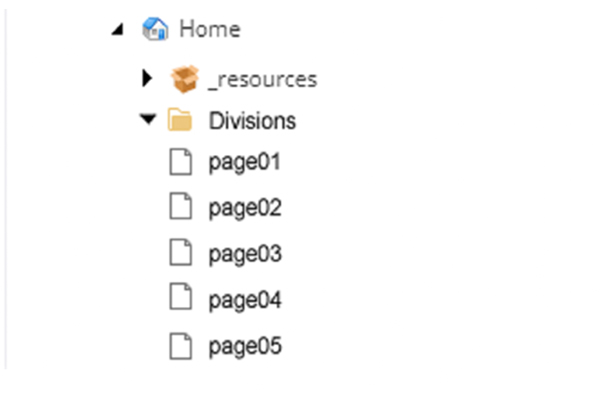
If the agency wants to make edits to pages Divisions 01-05 they may. If the agency wants to ADD a new Divisions page 06, they CANNOT add it to this file structure.
To do this, the agency must set up a new section of the website to accommodate the new Divisions content. If the agency requires a new section, and doesn’t want the URL structure to change, it is required that the new section be set up, and all the pages be rebuilt within the new structure. Also, scripted pages cannot be moved, they can only be rebuilt. Once the new section is complete, the scripted pages will need to be unpublished and then deleted.
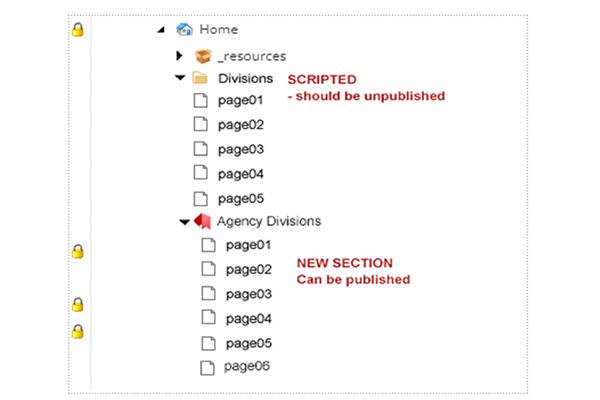
Important: Websites CANNOT have 2 or more pages with the same name in the same level of the content tree. New pages require unique names that are not duplicates with scripted pages or there will be a conflict between pages. If scripted pages must remain, then to avoid 404 errors, NEW page names need to be unique. If OLD pages are not needed, they should be unpublished and deleted.
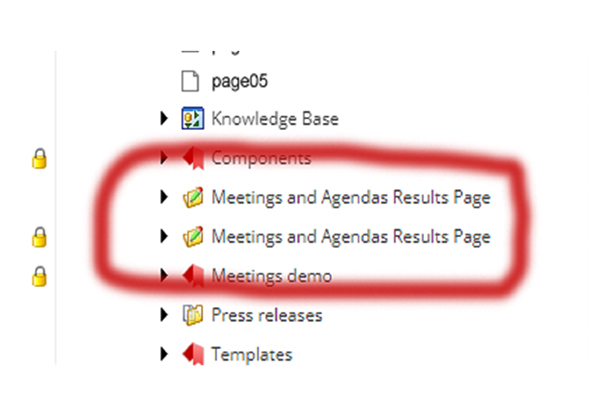
To avoid duplicate pages, the information architecture needs to be defined and approved before website development starts. An audit of duplicate names should address any issues and define a strategy for those links: either redirects, unpublishing, or rebuilding.
Thank you.
Questions? Reach out to the BITS-DGOE Engagement Team.
jeffrey.corriveau@ct.gov


