

Recent Communication
How to Subscribe to our Listservs
To Subscribe to the SDE Bilingual Grant Contacts listserv or the Title lll Grant Contacts listserv please send an email from the email address you wish to receive notices to.
- The email should be sent to; listserv@list.ct.gov.
- Please remove all text from the body in your email, including your contact information.
- In the body of your email please type; Subscribe SDE_Bilingual_Grant_Contacts firstname lastname or Subscribe SDE_Title_lll_Grant_Contacts firstname lastname and then send.
For example, Subscribe SDE_Bilingual_Grant_Contacts John Smith
September 16, 2026
Title lll Grants
We are writing to share that the Title III grant applications are now open in the eGMS. This email is being sent through the listserv, and it will also be posted on the ‘Recent Communications’ of the CSDE’s EL/ML page after sending. We apologize for the length of this email, but it includes important information pertinent to your grant application. Therefore, please take careful note of the following information:
- Intent to Participate: It is imperative that you complete this section in the eGMS system, especially if you plan to participate in Title III as a member of a consortium. Click on the Intent to Participate heading on the Sections page, and then select the manner in which your district will participate in Title III or if you will decline the funds. If your district is part of a consortium, you must list the fiscal agent on that page in the blank. If part of a consortium, please complete this page as soon as possible, but no later than Thursday, October 1.
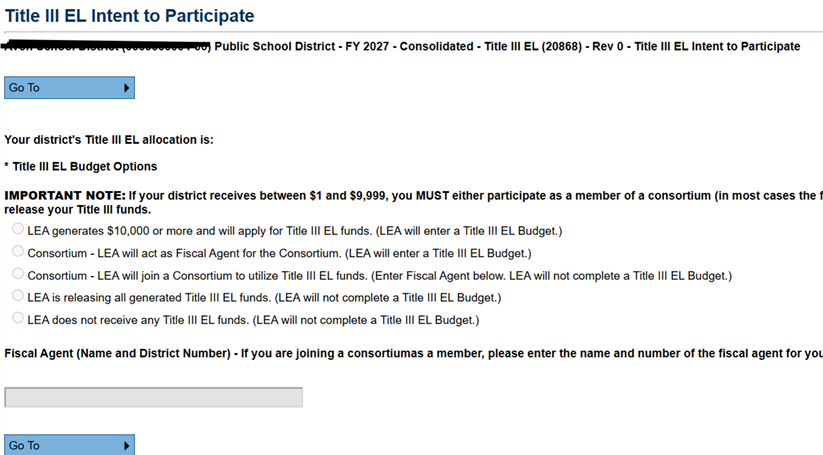
- Information for Consortia Members: As a consortium member, you will need to log into the system and confirm that you are participating in the consortium (described above in item 1). You will be able to view the amount of your district’s allocation at the top of the Intent to Participate page. Here is a screenshot:
You will also have to download, complete and upload the Related Documents for Title III. These include a program narrative page, a budget narrative, a consortium agreement form, and a private school participation form for all private schools in the district, if applicable. In addition to uploading them, you will either have to give the fiscal agent (consortium lead) viewing access so that they can see these documents, which will also give them viewing access to your other grants in the system or you will have to email or send the materials to them. Please see below regarding private schools as a Title III consortium member.
- Title III 2025-2026 Annual Evaluation Reports: Most districts have completed and submitted their Title III and Bilingual (if applicable) AER/s in the eGMS. I have attached the communications about the AERs, which also includes instructions for completing it. Prior to applying for this year’s Title III grant, please complete the AER in the eGMS. If your district has completed the AER, no action on this topic is needed. It is imperative that this report is completed, as it provides information about Title III activity implementation and yields data that is provided, in the aggregate, to the US Department of Education. Again, if you have already completed the Title III AER, thank you, and please disregard this item.
- Annual Title III district entitlements: The Title III entitlements are loaded into the eGMS and can be accessed there. Please note that the non-public entitlements are a portion of the public entitlement. For example, if your district entitlement is 12,000 and 2,000 is the non-public portion, the public portion is 10,000.
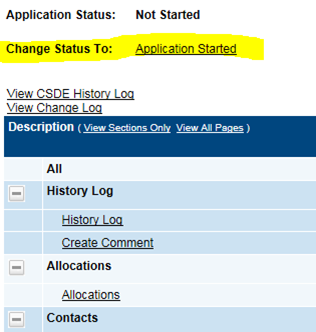
- Beginning your application: Once you have logged into the eGMS at https://connecticut.egrantsmanagement.com/ and select the Title III grant, the first step is to change the status to ‘Application Started’ on the top of the Sections page. Until the application is started by clicking that button, you will not be able to save nor will you be able to access certain content on the application. The screenshot below from the top of the “Sections” page shows the ‘Application Started’ that must be clicked:
- Private Schools: The eGMS system includes the public and non-public amounts for your district. Like last year, this year there continues to be an auto-calculating private schools page in the Title III EL application. Only private schools which have indicated that they have ELs will show up on the list in the Title III EL application. If the private school wishes to participate in Title III, select yes. If not, select no, and the entitlements will auto-recalculate. This page looks and functions the same as the private school page in the Title I grant application with which you may be familiar. Attached you will find instructions for completing this page in the Title III application. These instructions can also be accessed on the eGMS system in the CSDE Library and from the Program Instruction and guidance page. Please note: If you are a district with private schools and are participating in Title III through a consortium, the private school page in the eGMS will be in your fiscal agent’s Title III application in the system.
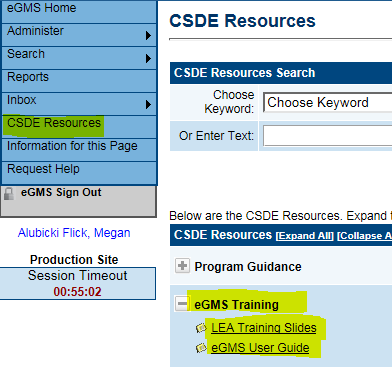
- eGMS User Guide and training slides: If you would like a refresher on how to use the eGMS system, the User Guide and training slides can be accessed by clicking the ‘CSDE Resources’ tab on the left side of the screen. Expand the eGMS training tab, and you will see the links to both resources. The screenshot below shows them highlighted.
- ‘Copy budget/program detail’ functionality in eGMS: Like last year, you will be able to copy your previous year’s Title III budget detail and program detail into your current year application. In order to do that, you must go into your budget screen or your program details, and click the button at the top (immediately below the ‘Go To’ menu) that says “Copy 2026 Budget Detail” or “Copy 2026 Program Detail.” This will populate those pages with your previous year’s information, and you will then be able to adjust accordingly. This is provided for your convenience, and you do not have to use this function unless you wish to do so. Please note that the ‘Related Documents’ content cannot prepopulate.
- Due Date: The encouraged due date for the Title III EL grant is Thursday, October 15, 2026. If your district is part of a consortium, it is likely that there will be an earlier deadline to ensure the consortium application can be submitted on time. Please complete the Intent to Participate portion of your Title III grant as soon as possible but by Thursday, October 1st 2026 at the latest. This ensures that we can load the consortium relationships accurately.
- Immigrant Subgrant: The immigrant subgrant entitlements are not posted at this time. You may see an entitlement of $0 for the immigrant subgrant. However, this is simply a placeholder. The immigrant grant will continue to be offered as a competitive application and will be posted in the next month. I will send a communication at that time regarding the grant competition and application process.
Instructions for Calculating Private School Share for 2027 Title III