


Effective October 10, 2025, pharmacies must submit an unscheduled/temporary/ holiday closure notification using the License Maintenance module in the eLicense system. You must use the eLicense login information associated with the Pharmacy (PCY) license to report the closure.
If the pharmacy is part of a pharmacy chain and you do not have the eLicense login information, please coordinate with your pharmacy chain’s corporate office on how to report the closure using eLicense.
To complete the notification:
- Log in to the eLicense account associated with the active PCY license.
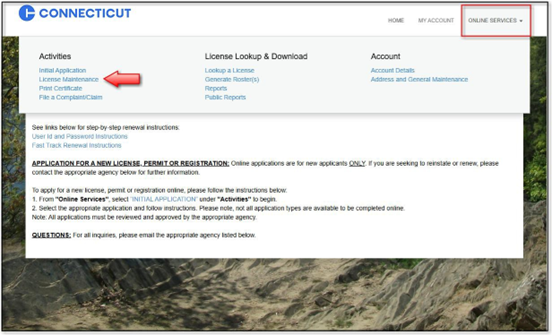
- At the top, click on "Online Services” and select "License Maintenance".
- Click "Start" next to the active pharmacy (PCY) license.
- From the dropdown menu choose "Temporary / Holiday Closure", then click "Next".
- Answer the questions. After answering all of the questions, click "Next" at the bottom of the screen.
- Review your responses on the next screen, then click "Finish" to submit your notification.

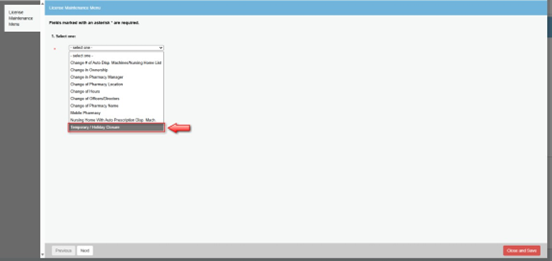

IMPORTANT: Clicking "Close and Save" will only save your progress. It does not submit your request. You must click "Finish" to complete the submission.
The pharmacy will receive a confirmation email once your notification has been successfully submitted. You will only be contacted by the department if there are additional questions or concerns. You must submit a report for each day the pharmacy will be closed.