


Applications for Pharmacy Manager** must be submitted by the pharmacy using the License Maintenance function in eLicense. The pharmacy should log into eLicense using the UserID and password associated with the pharmacy license.
**Pharmacists who have never served as a pharmacy manager must first appear before the Commission of Pharmacy. Your appearance in front of the Commission of Pharmacy must take place before you can assume the role of pharmacy manager.
If the pharmacist has served as a pharmacy manager before and has already appeared before the Commission of Pharmacy, you do not need to appear before the Commission of Pharmacy again.
To submit a Change of Pharmacy Manager application:
- Log in to the eLicense account associated with the active Pharmacy (PCY) license.
- At the top, click on "Online Services” and select "License Maintenance".
- Click "Start" next to the active PCY license.
- From the dropdown menu choose "Change in Pharmacy Manager", then click "Next".
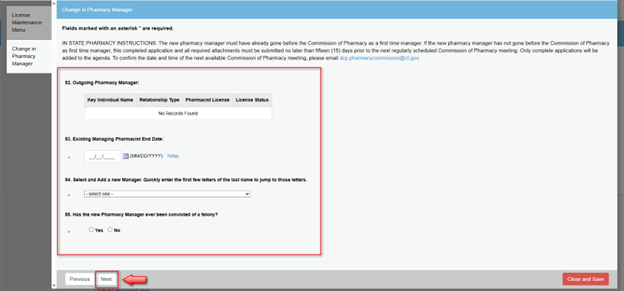
- Answer the series of questions. After completing the questions, click “Next”.
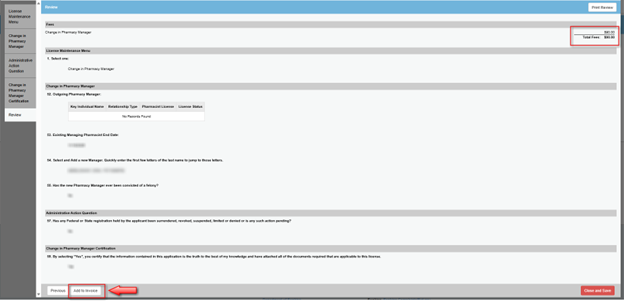
- Review your responses on the next screen, then click "Add to Invoice" to pay the fee.
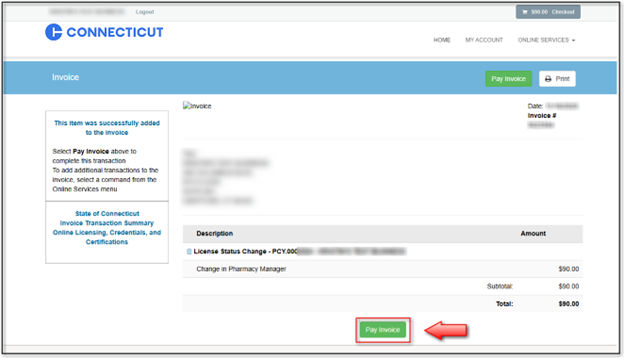
- Click "Pay Invoice". IMPORTANT: Clicking "Close and Save" will only save your progress. It does not submit your request. You must click "Pay Invoice" to submit your request.


You will receive a confirmation email once the request has been successfully submitted. Requests are reviewed and processed in the order they are received. Once the change has been processed, a copy of the updated license reflecting the new manager will be emailed to the Pharmacy.